How to find Trending topics
Stay ahead of the curve by discovering viral topics and discussions across the web before they peak.
Steps
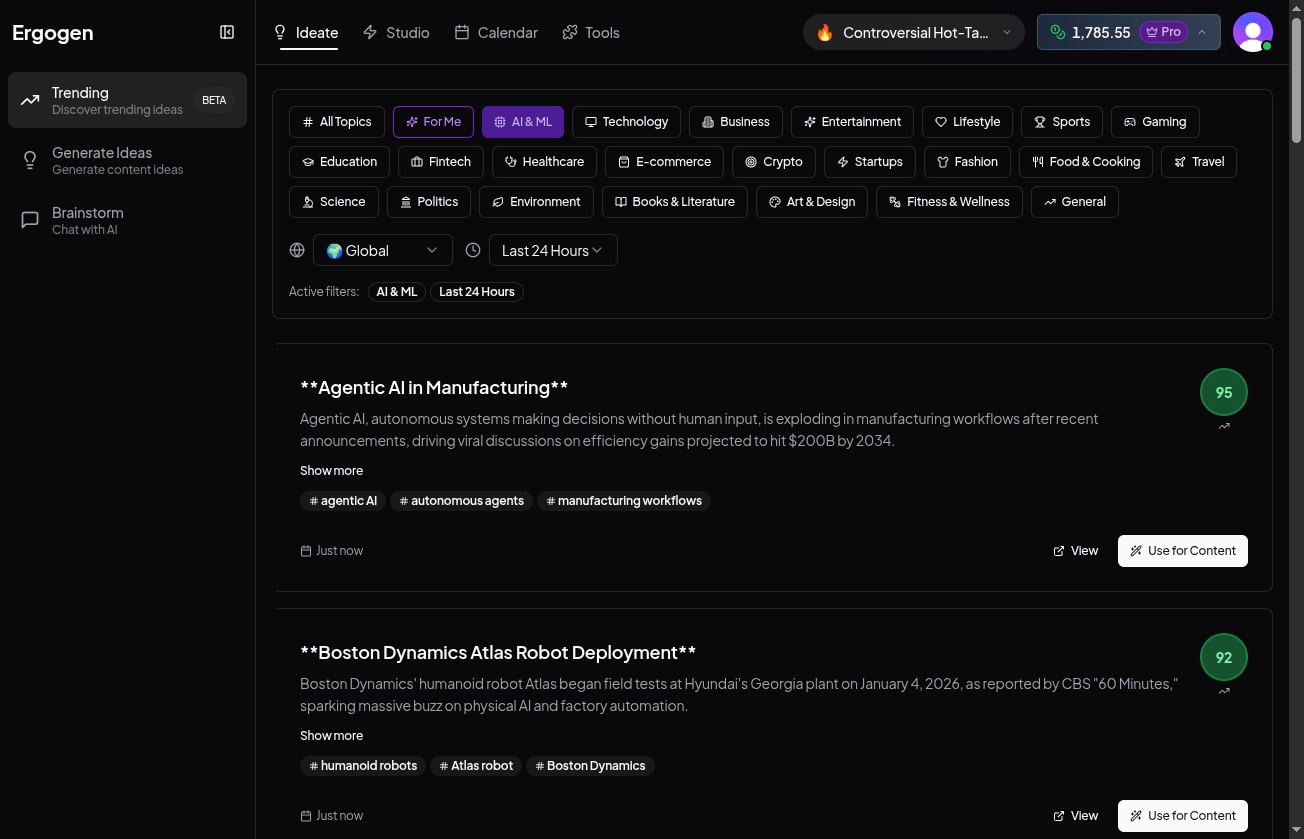
1. Go to Trending
Click Ideate in the main navigation, then select Trending from the sidebar.
2. Filter Your Feed
Use the category tags to narrow down your view. Select multiple filters to customize your feed.
Filters include: For Me, AI & ML, Technology, Business, Entertainment, Lifestyle, Sports, Gaming, Education, Fintech, Healthcare, E-commerce, Crypto, Startups, Fashion, Food & Cooking, Travel, Science, Politics, Environment, Books & Literature, Art & Design, Fitness & Wellness, General.
3. Refine by Region & Time
Use the dropdowns to filter content by location (e.g., Global, US, India) and time period (e.g., Last 24 Hours) to catch fresh waves.
4. Analyze & Create
Each card shows a 'Virality Score' (green badge). Click 'Use for Content' on any card to instantly start drafting a post based on that trending story.
Pro Tip: Follow the Score
Look for the green score badge (0-100). A score above 80 indicates high viral potential.