How to Research & Refine Ideas
Move beyond simple headlines. Use the Research tool to deepen your understanding, find angles, and gather facts before you write.
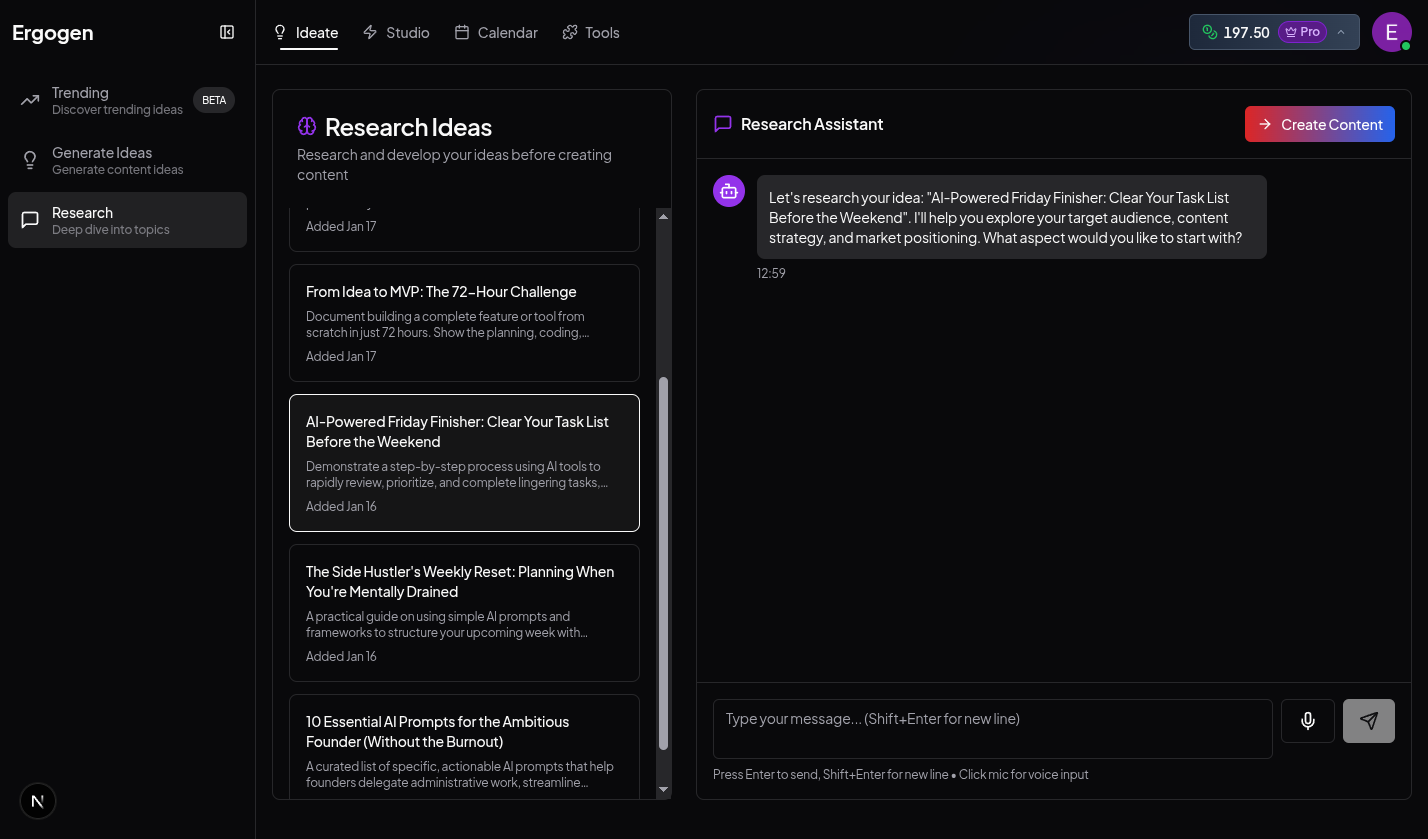
The Research workspace allows you to chat with AI to deepen your understanding of any topic.
Steps
1. Select an Idea
Navigate to Research by clicking the Ideate tab in the main navigation bar, then selecting Research from the sidebar. Your ideas from Ideate and Trending will automatically appear here.
2. Chat with AI
Use the dedicated chat interface to explore your topic. Ask the AI for:
- Relevant statistics and data points
- Contrarian viewpoints or unique angles
- Historical context or future predictions
- Specific examples or case studies
3. Gather Insights
As you chat, the AI identifies and saves key insights.
4. Export to Studio
Once you have refined your angle and gathered enough material, click 'Create Content', and choose the content type (e.g., blogs/articles, post, etc.). Your research brief and insights will be automatically attached to your content draft, giving you a head start on writing.
Why Research First?
Content backed by specific data and unique insights performs significantly better than generic advice. The Research phase bridges the gap between a "good topic" and a "great post".